Parallel multi-agent workflows.
Provable. Observable. Controllable.
Shofer is a new (June 2026) open-source AI coding agent for VS Code with unparalleled parallelism, usability and observability. Specify multi-agent workflows declaratively, and watch them execute as live diagrams — on top of all the standard features you expect from your AI-powered development environment.

See Shofer in action
A quick walkthrough of Shofer's parallel tasks, declarative workflows, and visualizations in a real VS Code workspace.
What sets Shofer apart
Provable Multi-Agent Workflows
Specify a whole multi-agent pipeline declaratively in a .slang file — agents, message routing, control flow, a convergence condition, and budgets — then a non-LLM executor runs it.
- Slang DSL: a deliberately constrained language to express multi-agent interactions
- Statically analyzable — deadlocks & orphan agents caught before a run
- Per-agent output contracts + a deterministic, repeatable scheduler
Live Agent Visualization
Shofer gives you the tools to introspect, troubleshoot and optimize your multi-agent workflows, with beautiful diagrams right on your IDE.
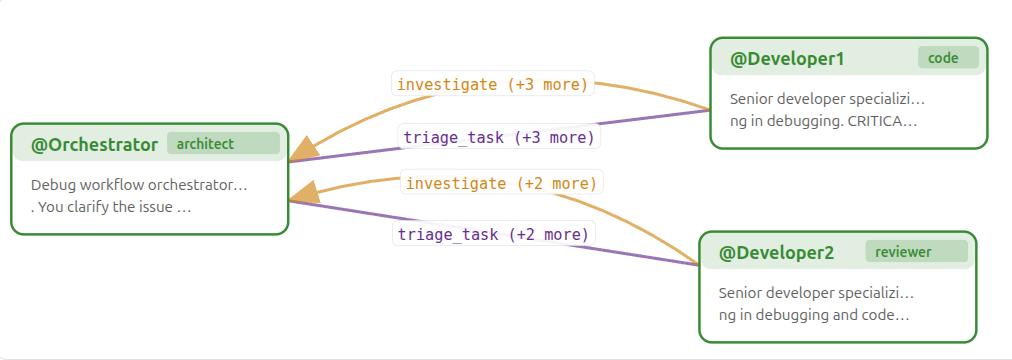
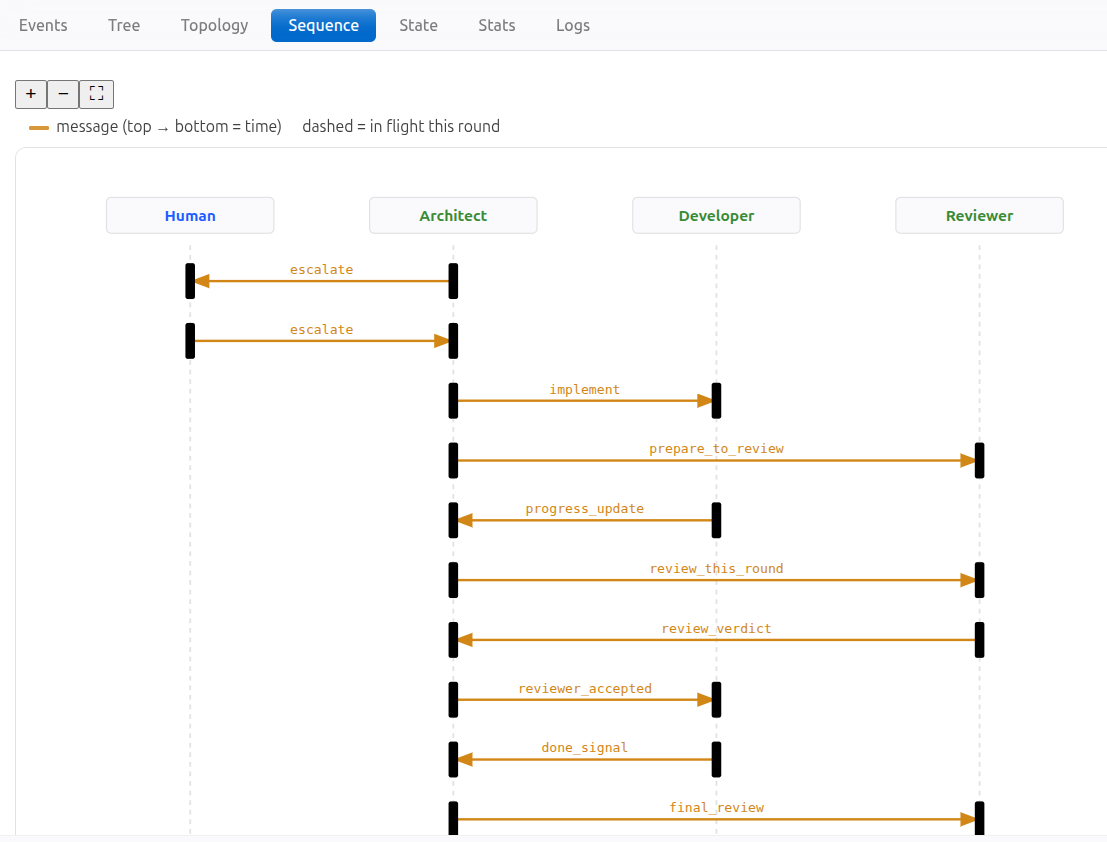
- Topology / Sequence / Swimlane diagrams with live runtime overlays
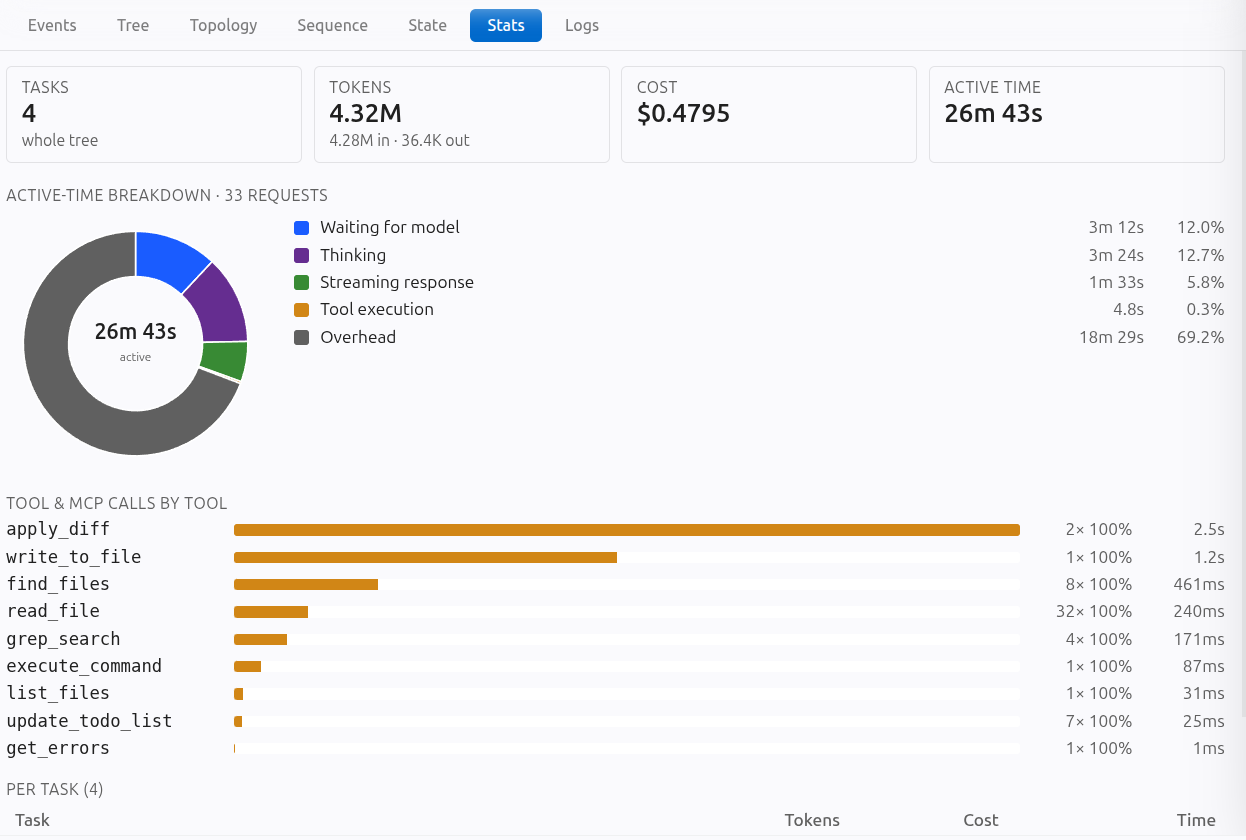
- Latency/Reliability breakdowns: active-time donut + per-tool breakdown across the whole tree
- Filterable per-session Logs
- Export the complete wire protocol for any session to a .json file for offline analysis
Codebase memory that stays in-sync
Long-lived memory you can talk to: a persistent, read-only Assistant Agent that accumulates codebase knowledge across sessions — backed by the local semantic index. Other sessions just ask it instead of reloading context.
- Runs on a low-cost model with a large context window
- KV-cache friendly and Read-only — with powerful code exploration tools
Fast Code & Git Indexing
A semantic index over your code and your entire git history — kept fast because it's incremental, and computed and stored on the backend of your choice.
- Semantic code search — AST-aware chunking via tree-sitter
- Git-history indexing — git_search finds why & when a change was made
- Incremental — only changed files/segments are re-embedded
- Bring your own backend — choose the embedding model and vector store
Parallel and Asynchronous
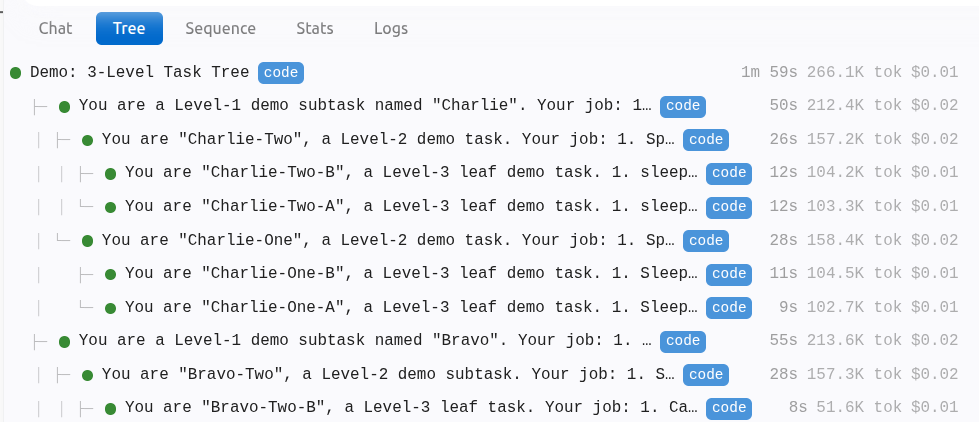
Parallelism end to end: run many independent sessions at once in a tree, and asynchronous MCP tool calls (fire-and-forget) instead of blocking the loop.
- Many independent sessions in a tree — switch without losing state
- Background subtasks with parent-child communication + message queuing
- Fire-and-forget call_mcp_tool_async with call_id tracking
- wait_for_mcp_call all/any strategies; delete-on-read trimming
Hard Cost Caps
Set a USD budget per session. When the limit is hit, the agent loop pauses or aborts — session-level protection against runaway autonomous loops, across any provider.
- Per-session USD limits
- Automatic halt soon after the moment a threshold is crossed
- Whole-tree cost & token rollups in the header
Excellent Git Worktree Support
Run parallel sessions on different branches in one VS Code window. No more stash/commit gymnastics or accidental overwrites — and each worktree is kernel-sandboxed.
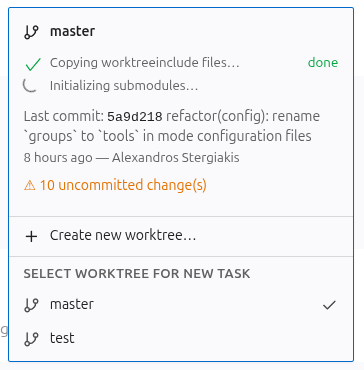
- UI-driven create, switch, and delete operations
- Each session scoped to a specific worktree branch
- Automatic .worktreeinclude for gitignored files
- Kernel-level (Landlock/bwrap) command sandboxing confined to the worktree
6 Built-in Modes. Infinite Customizations.
Code, Architect, Debug, Code Search, Web Search, and Reviewer out of the box — each with scoped tool access. Define your own modes via .shofermodes to match any workflow exactly.
- Fine-grained tool-category control (read, write, execute, mcp, …)
- File-scoped restrictions (e.g. write only .md files)
- Precise customization on what goes into the system prompt
Git submodules, changelist, LSP support, and overall UI/UX Polish
Thoughtful details that make the agent feel like a first-class development tool — session changelog, agent self-assessment, native git submodule support, LSP-powered refactoring, and MCP-aware auto-approval.
- Working changelist: see every file changed in a session at a glance
- Agent self-assessment & rating after each task
- Git submodule support — works out of the box, no configuration needed
- Full set of input capabilities — receive user input using check/radio boxes, dropdowns, etc
- Auto-approval categories extend to MCP tools
Built-in multi-agent workflows
Capture a multi-agent collaboration pattern in an .slang file (or ask the agent to create it for you).
Shofer comes with two standard workflow patterns (see below). Create your own in .shofer/workflows/ and share it with the community.
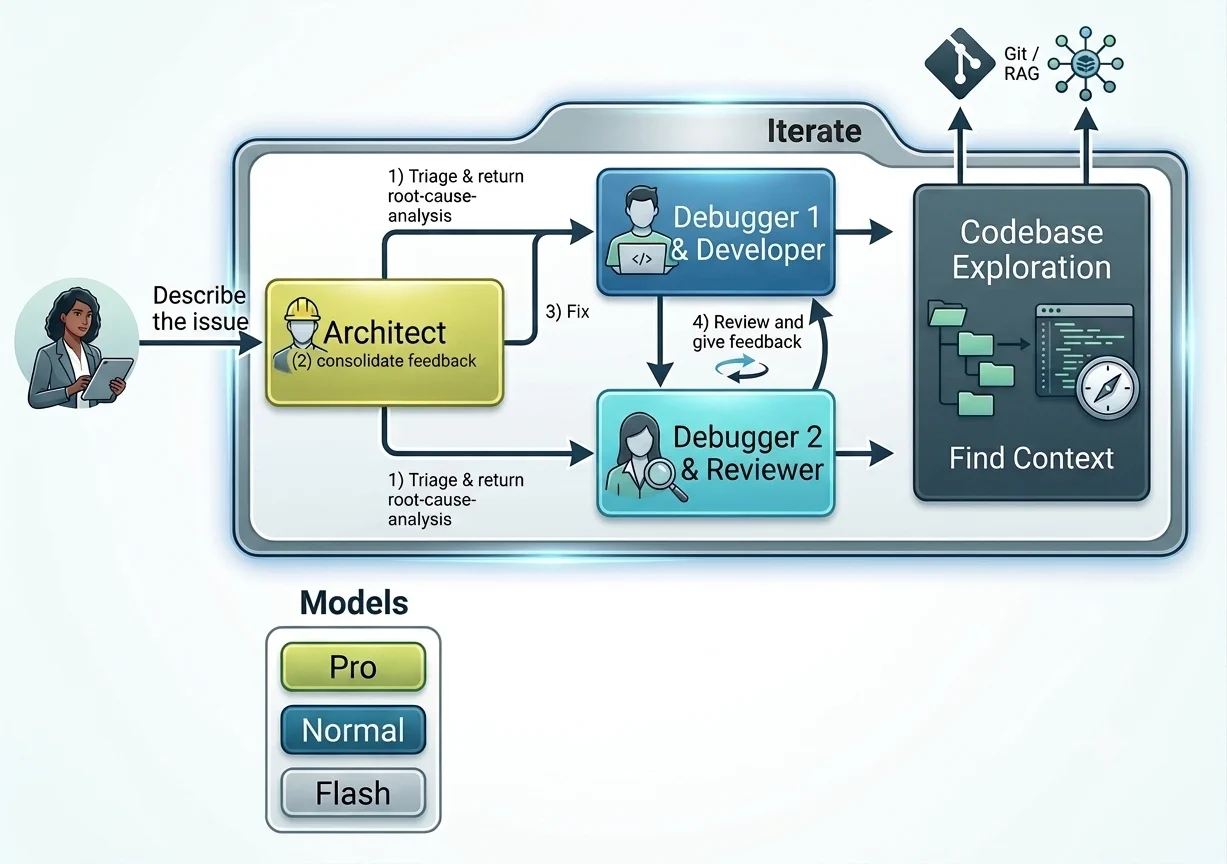
Collaborative Debug
Two developers independently triage, converge on the root cause through peer review, get user sign-off, then one fixes while the other reviews — iterating until both are satisfied.
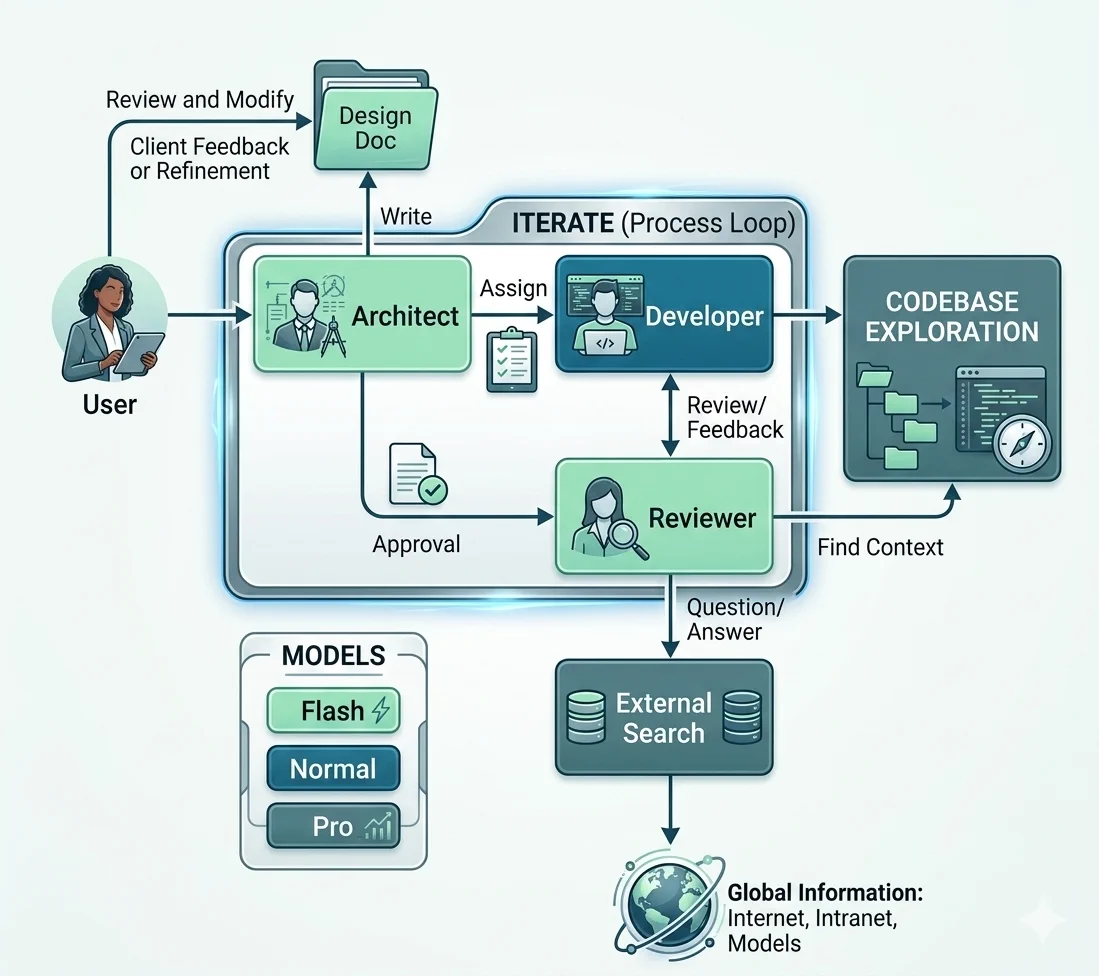
Implement a Feature
The Architect designs, you approve, then Developer implements while Reviewer inspects — iterating until done. Full design → implementation → review pipeline.
Workflows are specified in .slang — a declarative language for multi-agent orchestration. Ship custom workflows with your project or install them globally.
Live Agent Visualization
Open WorkflowView and the whole agent tree becomes legible. A topology graph shows the current round — who's running and who they're sending to or waiting on. A sequence timeline replays every message, escalations to @Human included. Per-agent swimlanes mark exactly which step each agent is on, a Stats tab breaks active time down by phase and tool across the entire tree, and a filterable Logs stream shows everything that happened. The same diagrams render for any .slang file in an editor tab.
Read the full docs 
Codebase memory that stays in-sync
A long-lived, read-only companion agent accumulates codebase knowledge as you work, backed by the local semantic index (RAG). Other sessions query it instead of re-reading and re-paying for the same context — so a warm, shared context window serves many cheap queries.
Read the full docs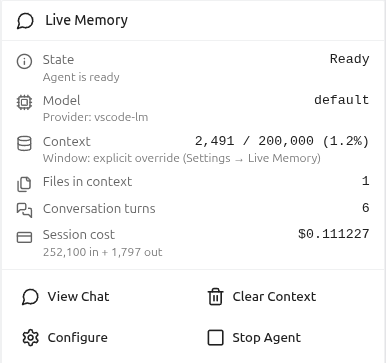
Fast Code & Git Indexing
Shofer's RAG is fast because it's incremental — it re-embeds only what changed. It indexes your code with AST-aware, tree-sitter chunking and your entire git log, so your agents can get the historical context of a change. And it runs on a backend you own: pick your embedding model (e.g. local via Ollama) and your vector store, so the index is computed and stored on infrastructure you control.
Read the full docs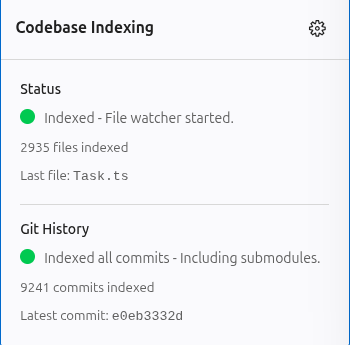
Parallel and Asynchronous
Parallelism runs through the whole product. Run many independent conversations at once in a task tree — switching freely without losing state, queueing messages while an agent works, and fanning out background subtasks that report back to their parent. Both A2A and MCP tool calling are fully asynchronous, so that your agents can do more work in the same amount of time.
Read the full docs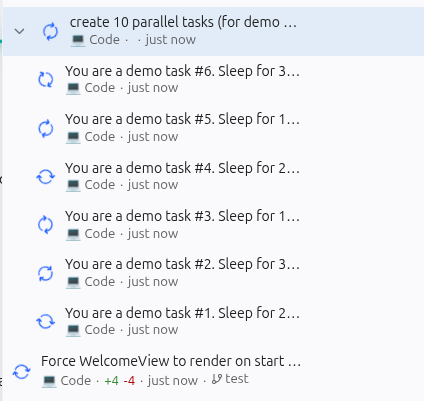
Hard Cost Caps
Give a session a hard USD budget. Shofer tracks spend live across the whole task tree and pauses or aborts soon after the moment the cap is crossed — so a runaway autonomous loop can't quietly burn your balance.
Read the full docs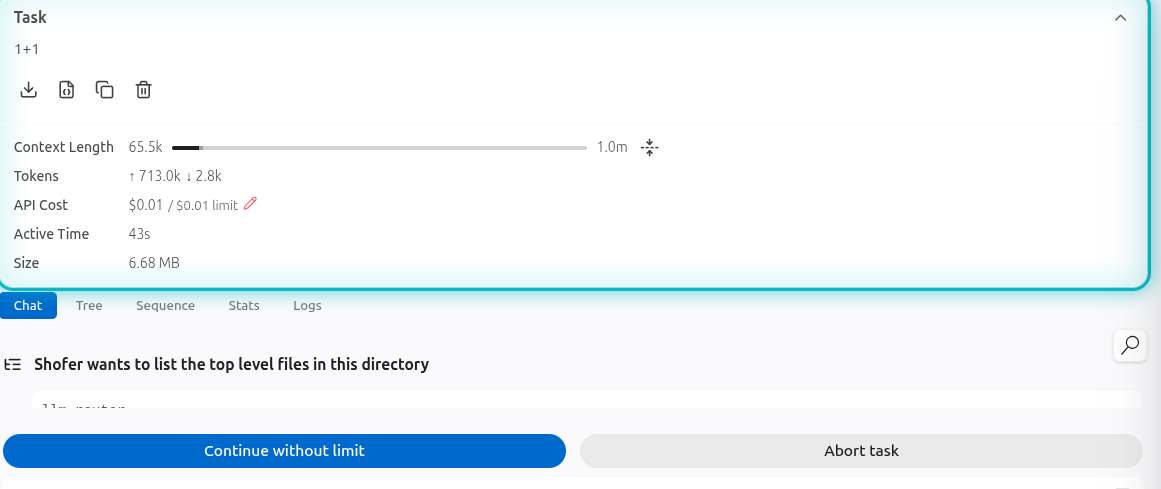
Excellent Git Worktree Support
Keep parallel sessions on separate branches in a single VS Code window — no stash dance, no extra windows. Create, switch, and delete worktrees from the UI; each session is scoped to its branch. Each worktree is a security boundary: shell commands run inside an OS-level sandbox that confines writes to the active worktree. (available in Linux only)
Read the full docs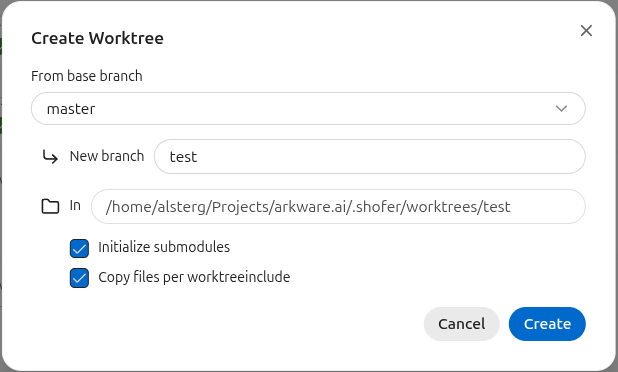
Git submodules, changelist, LSP support, and overall UI/UX Polish

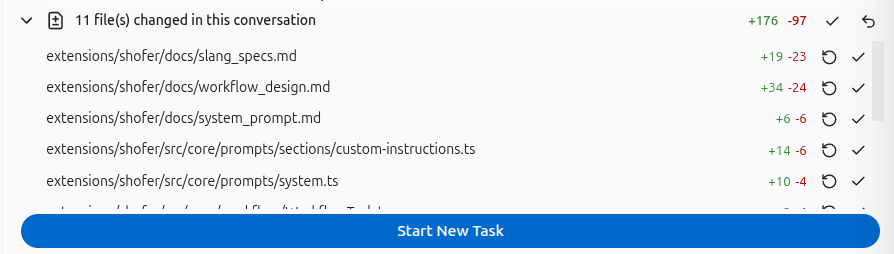

- A session changelog shows every file modified at a glance — no more git diff to remember what happened.
- Each task ends with an agent self-assessment and rating, giving you a quick signal on quality.
- Git submodules work out of the box — no configuration, no workarounds — Shofer's code-indexer, git-history watcher, and file watcher descend into nested repos automatically.
- LSP integration lets the agent rename symbols and find all usages across the workspace via the language server.
- And the auto-approval system extends to per-MCP-tool toggles and categories, so you can keep fast iteration with fine-grained control.
6 built-in modes. Infinite customizations.
Each mode has scoped tool access. Create your own via .shofermodes files — project-level or global.
Code
Writing, modifying, and refactoring code. Broadest tool access.
Architect
Planning and designing before writing code. Read + markdown-only writes.
Debug
Troubleshooting errors and diagnosing root causes.
Code Search
Searching the codebase for functions, patterns, and context. Read + execute only.
Web Search
Browsing and extracting web content. Browser + MCP.
Reviewer
Reviewing code for bugs, security issues, and design problems. Diagnostic only.
Create custom modes for your specific workflows — project-level or global.
Learn how to create custom modesAlready using another AI coding tool?
One-command migration from GitHub Copilot and Claude Code — and a clean path from OpenCode. Your configuration, modes, and rules come with you.
Migrating from GitHub Copilot
Shofer offers everything Copilot does and much more — with full privacy, model autonomy, and granular control over every aspect of your AI coding experience.
/migrate-from-copilot Full guide ↗ | Aspect | Shofer | Copilot |
|---|---|---|
| Data Processing | 100% local execution — no remote server processes your workspace | Cloud-proxied through Microsoft/GitHub infrastructure |
| Network Autonomy | Fully operational in air-gapped environments with local models | Requires active internet and constant telemetry handshake |
| Agent Orchestration | Declarative Slang execution graph — deterministic message routing, control flow, and budgets, plus spawn/monitor/converse with child agents | Parallel Cloud Agents (isolated GitHub Actions envs) + third-party agents — orchestrated via remote envs/hooks, not a developer-authored graph |
| Cross-Session Memory | A persistent local Assistant Agent plus an AST/git embedding index that never expires and stays on your machine | Copilot Memory — an automated, repo-scoped cloud memory graph that expires after ~28 days (+ a local VS Code memory tool) |
| Async MCP | Fire-and-forget async tool calling with parallel execution | Synchronous request-response — entire loop blocks on tool calls |
| Cost Control | Per-task / per-session hard USD caps with automatic agent halting | No per-task hard USD cap that halts an agent mid-loop |
| Pricing | Free Open Source (Apache 2.0) — pay only for your own API tokens, or $0 fully local | Usage-based credit-drawdown billing (Free / Pro / Pro+ / Max) with metered overages |
Migrating from Claude Code
Keep the agentic power, but bring any model (including local/offline), a graphical cockpit, deterministic Slang Workflows, semantic code & git-log search, native worktrees, and hard cost caps.
/migrate-from-claude Full guide ↗ | Aspect | Shofer | Claude Code |
|---|---|---|
| Primary Surface | Native VS Code GUI cockpit — task tree, live diagrams, cost panels — plus a headless CLI | Terminal-first CLI, with companion IDE and web/desktop apps |
| Model Ecosystem | Bring-Your-Own-Model — Anthropic (same Claude models), OpenAI, OpenRouter, xAI, Bedrock, or local via Ollama/LM Studio | Anthropic Claude lineup (Mythos, Fable, Opus, Sonnet, Haiku) |
| Offline / Air-Gapped | Fully operational offline with local models | Requires connectivity to Anthropic's API |
| Source Availability | 100% open-source (Apache 2.0) — inspect every tool hook and prompt | Proprietary agent (open SDK, closed core) |
| Multi-Agent Orchestration | Declarative, deterministic Slang Workflows — repeatable, inspectable, and visualized | Imperative subagents the model spawns at runtime, plus dynamic workflows expressed in Javascript |
| Agent Visibility | In-editor agent graph, sequence/swimlane diagrams, a Stats breakdown, and filterable Logs | Terminal-first with /agents and /tasks, plus a companion Desktop app (parallel tasks, diffs, PRs) |
| Autonomy & Sandboxing | Kernel-level Landlock/bwrap write sandbox + native worktrees — a deterministic guarantee, not a classifier | Auto Mode risk classifier + /batch worktree orchestration; safety via permission prompts/classification |
| Semantic RAG (code + git) | Precomputed semantic index over code and the entire git log; git_search answers why/when by concept | Dynamic agentic search + Auto Memory; no persistent semantic embedding index |
| Cost Control | Hard per-task / per-session USD caps that halt runaway loops | Per-session reporting |
Migrating from OpenCode
Same open-source, model-agnostic philosophy — plus a graphical VS Code cockpit, parallel orchestration, semantic code & git-log search, native worktrees, and a deterministic multi-agent Workflow engine. Your AGENTS.md rules carry over directly.
/migrate-from-opencode Full guide ↗ | Aspect | Shofer | OpenCode |
|---|---|---|
| Primary Surface | Deeply VS Code-native GUI cockpit — task tree, live diagrams, cost panels — plus a headless CLI | Multi-surface & editor-agnostic — TUI, Desktop app, and IDE extensions (VS Code, Cursor, JetBrains, Zed, Neovim, Emacs) over the open ACP standard |
| Philosophy | Open-source (Apache 2.0), model-agnostic, local-first — same foundation | Open-source, model-agnostic, local-first |
| Task Visibility | Graphical task tree + Topology / Sequence / Swimlane diagrams, Stats, and Logs | Terminal transcript / TUI panes |
| Multi-Agent Orchestration | Declarative, deterministic Slang Workflows — the control flow itself is declarative, repeatable, inspectable, and visualized | Declarative custom agents in Markdown (.opencode/agents/) with per-agent permission locking; routing imperative at runtime |
| Parallelism | Many concurrent tasks and full workflow trees, with background subtasks and async MCP | Specialized subagents (general / explore / scout) run isolated parallel background tasks |
| Code Understanding | Precomputed semantic index over code and the entire git log; git_search answers why/when by concept | Deep real-time LSP integration — feeds live compiler diagnostics & type errors back to the model |
| Worktrees & Sandboxing | Native worktree UI + OS-level command sandboxing (Landlock/bwrap) | Manual git worktree; permission prompts |
Built in the open, for everyone
Shofer is community-driven and open source (Apache 2.0). Join us — contribute code, share ideas, or just say hi.
Discord
Chat with the team, get help, share feedback
discord.gg ↗Community discussions and tips
reddit.com ↗GitHub Issues
Bug reports, feature requests, and tracking
github.com ↗GitHub
Source code, roadmap, and contributing guide
github.com ↗Ready to take a ride? Shofer (from the French chauffeur — driver)
Install the VS Code extension and start coding with the full power of AI — on your terms, with your models, under your control.